Does YNAB Support Multiple Currencies? Workarounds & Alternatives
Understand YNAB’s one-currency-per-plan limit, compare practical workarounds, and see how a USD/EUR budget works in a multi-currency alternative.
YNAB supports one currency per spending plan. It does not natively combine accounts in different currencies within that plan. You can choose euros, dollars, pounds, or another supported currency, but choosing the symbol does not add currency conversion. YNAB’s currency FAQ
That distinction matters when your salary lands in USD and your rent leaves in EUR. It matters less when you take an occasional trip and your home bank converts your card spending for you. The right setup depends on which of those situations looks like your life.
This guide is written by Budgero, one of the alternatives discussed. Competitor features are based on the official documentation linked below, checked September 5, 2026. The worked example uses illustrative rates, and the Budgero screenshot shows a separate example transfer. This is not a hands-on review of every app or integration.
Your options at a glance
| Your situation | An approach to consider | The trade-off |
|---|---|---|
| Occasional travel, paid from your home-currency account | Record the settled amount in your YNAB plan’s currency | You may need to correct an estimate after the payment settles |
| Separate finances in two currencies | Keep one YNAB plan per currency | Planning and reports stay separate |
| You want to keep YNAB and convert foreign transactions | Evaluate a third-party currency integration | An additional service changes transactions in your plan |
| Income, spending, and savings regularly cross currencies | Use an app with multi-currency accounts and converted budget totals | You need to learn and, potentially, migrate to another app |
Three ways to work with multiple currencies in YNAB
1. Use a separate plan for each currency
YNAB recommends separate plans when you regularly use multiple currencies. You could keep a euro plan for your European accounts and a dollar plan for your US accounts. Each plan retains amounts that match the accounts it contains. YNAB’s multiple-currency guide
This can suit finances you already manage independently. The extra work appears when the same household goal depends on both: you need to combine the plans yourself to assess the full picture.
For example, if a bank converts $500 into €450, those are the two amounts you need to reconcile in the respective plans. Adding the outgoing $500 and incoming €450 as if they shared a unit would produce a meaningless total. Keep any separately charged fee visible when checking the statements.
2. Record travel spending in your plan’s currency
If a euro-denominated card pays for a $50 purchase, your euro account eventually shows the amount your bank charged in euros. Recording that settled amount keeps a euro plan aligned with the account. YNAB’s travel guidance also describes using estimates and adjusting them when the converted amount is known. YNAB’s travel and currency guidance
Suppose you initially record €45, then the bank settles the charge at €46.20. Update the existing transaction to €46.20 and check that it is represented only once. The extra €1.20 belongs in your spending calculation too.
A separate USD account creates a different problem: its statement still shows dollars. Maintaining only euro equivalents then requires an additional record or conversion process to reconcile the original dollar balance.
3. Use a third-party YNAB currency integration
YNAB’s Works with YNAB directory lists third-party currency tools. One example, Multi-Currency for YNAB, describes converting foreign transactions into your plan currency and adding the original amount and exchange rate to the memo. It offers manual review or daily background conversion.
This may be worth evaluating if you are happy with YNAB’s planning workflow. It is an integration that updates your transactions, so check how it handles edits, transfers, reconciliation, permissions, and its current fees before adopting it. The converted plan still uses one currency; the integration handles the translation around it.
What to look for in a multi-currency YNAB alternative
When comparing apps, try one foreign purchase and one transfer between your own accounts. Check that you can answer these questions afterward:
- What actually left the account? The original amount and currency should remain available for checking against the statement.
- How much did it use from my category? You need a converted amount in the currency you use for planning.
- Which rate was used? A market reference rate may differ from the rate or fee on your bank’s receipt.
- Can I reconcile both sides of a transfer? Money moving between your accounts should be distinguishable from a new purchase or new income.
- How will transactions arrive? Currency support and automatic bank connections are separate features.
Budgero: envelope budgeting with accounts in different currencies
Budgero lets each account have its own currency while categories and budget totals use one chosen budget currency. A foreign transaction keeps its original amount, converted amount, and exchange rate. You can use fetched rates, set custom rates, or override an individual transaction’s rate. How Budgero handles currency conversion
Budgero's automatic bank sync is optional and in beta: you bring your own SimpleFIN connection for US and Canadian banks or Enable Banking for European ones, and Budgero's servers never see the bank data. Coverage varies by bank. Manual entry and file imports work everywhere. The software is free to self-host, with hosting, updates, and backups your responsibility. Managed Cloud costs $4/month or $35/year.
Lunch Money: another option for a consolidated currency view
Lunch Money supports a primary currency for budget summaries, charts, and account totals while allowing transactions in other currencies. Its documentation describes transaction-date exchange rates. Include it in your shortlist and compare how its budgeting workflow fits your own. Lunch Money’s multi-currency documentation
PocketSmith: multi-currency accounts, budgets, and reports
PocketSmith converts foreign accounts and transactions into a base currency for combined totals. Its documentation also explains a limitation: planning a transfer budget across currencies requires separate budgets for each side and manual conversion of the planned amounts. Check that workflow if cross-currency transfers are frequent for you. PocketSmith’s multi-currency overview
Worked example: a USD account inside a euro budget
Imagine you plan household spending in euros and keep some money in a dollar account. For this example, hold the exchange rate constant at $1 = €0.90. This is an illustrative rate, not a current quote.
| Account | Original balance | Value in the EUR budget |
|---|---|---|
| Euro account | €1,500 | €1,500 |
| Dollar account | $1,000 | €900 |
| Combined value | €1,500 plus $1,000 | €2,400 |
Now spend $50 on groceries from the dollar account, with €200 available in the Groceries category before the purchase:
- The account records a $50 expense, so its original balance becomes $950.
- At the example rate, the expense converts to €45: $50 × 0.90.
- The Groceries category has €155 available afterward: €200 − €45.
- Reconcile the dollar account against $950 on the bank statement. Use the converted €45 when reviewing household grocery spending.
This is the distinction a multi-currency budget needs to preserve: the account balance is in dollars, while the category decision is in euros. The app’s conversion is a budgeting calculation; it does not exchange or move money at your bank.
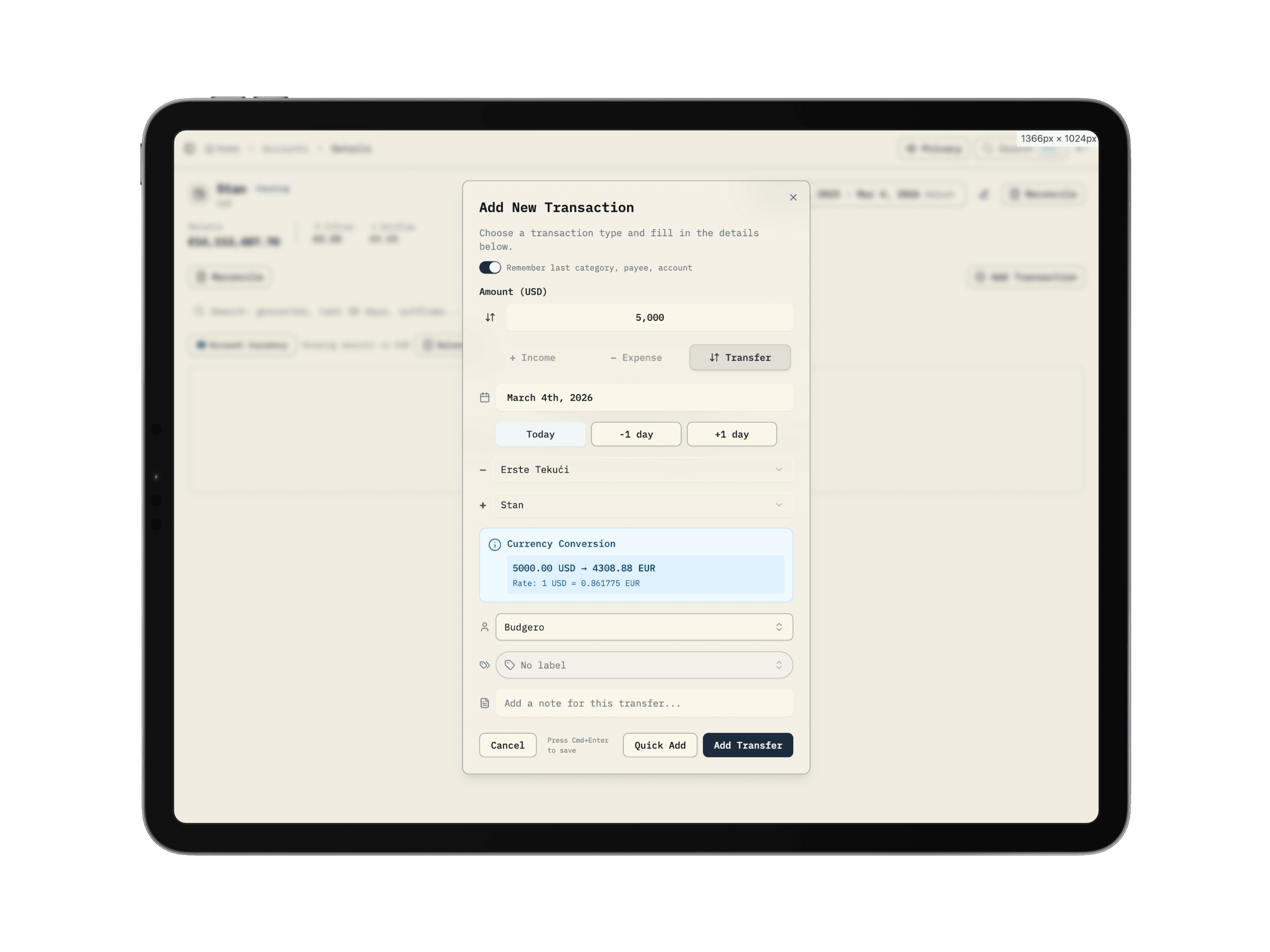
Budgero’s transfer dialog shows both currencies and the conversion rate. This existing product screenshot illustrates a separate USD-to-EUR transfer; its amounts and rate differ from the grocery example above.
In Budgero, start by choosing EUR as the budget currency, then create the dollar account with USD as its account currency. Enter or import a small sample of transactions, check their original and converted amounts, and reconcile before importing more history. If you need a specific conversion rate, use the controls explained in the exchange-rate guide.
Moving an existing YNAB plan to Budgero
Begin with the same budget currency as your YNAB plan so you can compare the imported totals. Budgero supports a direct YNAB import or an export ZIP; the two methods preserve different details. Follow the YNAB import guide, review reported differences, and check accounts, categories, debt links, goals, and scheduled transactions before relying on the result.
If a third-party tool previously converted your foreign amounts into the YNAB plan’s currency, do not assume an importer can recover the original account currencies and transaction amounts. Inspect a sample against the original statements before setting up foreign accounts. Likewise, importing a plan does not automatically merge several separate currency plans into one household budget.
Common questions
Does choosing EUR in YNAB convert USD transactions?
No. Selecting a plan currency does not provide native conversion between currencies within that plan. Match the amounts to the plan currency or use a conversion workflow. YNAB’s currency FAQ
Do I need to leave YNAB for occasional international travel?
Often, no. If your home bank settles everything in your plan’s currency, recording the settled amounts can be sufficient. Regularly holding and spending from foreign-currency accounts is a stronger reason to evaluate a different setup.
Will multi-currency support connect my international bank?
Not necessarily. Check currency handling and bank coverage independently. Budgero supports accounts in different currencies through manual entry and file imports everywhere, plus optional bank sync through SimpleFIN (US and Canada) or Enable Banking (Europe) where your bank is covered.
Which approach should I try first?
If your existing YNAB workflow works well apart from occasional travel, start with its documented workarounds. If you regularly need one category plan across accounts in several currencies, compare multi-currency apps using a small, representative sample of your finances. For the broader feature comparison, read Budgero vs YNAB.
Prefer running your own server? Self-host Budgero for free, or explore the multi-currency budgeting overview.