The Monarch Money Alternative for Europe Manage EUR, GBP, and CHF accounts in one budget.
Monarch officially supports the US and Canada and does not convert currencies within a budget. Budgero supports 168 currencies with end-to-end encrypted budget sync. Bring transactions through file import, manual entry, or optional zero-knowledge bank sync with your own Enable Banking account.
35 days free, no card needed. Works in every European country, in your currency.
What Monarch’s Europe and currency limits mean
Monarch’s official FAQ lists availability in the US and Canada. That limits the usefulness of its bank-connected workflow for a household banking in Europe.
Its currency documentation explains that it displays dollar amounts without differentiating or converting currencies. A £50 transaction and a €50 transaction cannot simply be combined into a meaningful total without conversion.
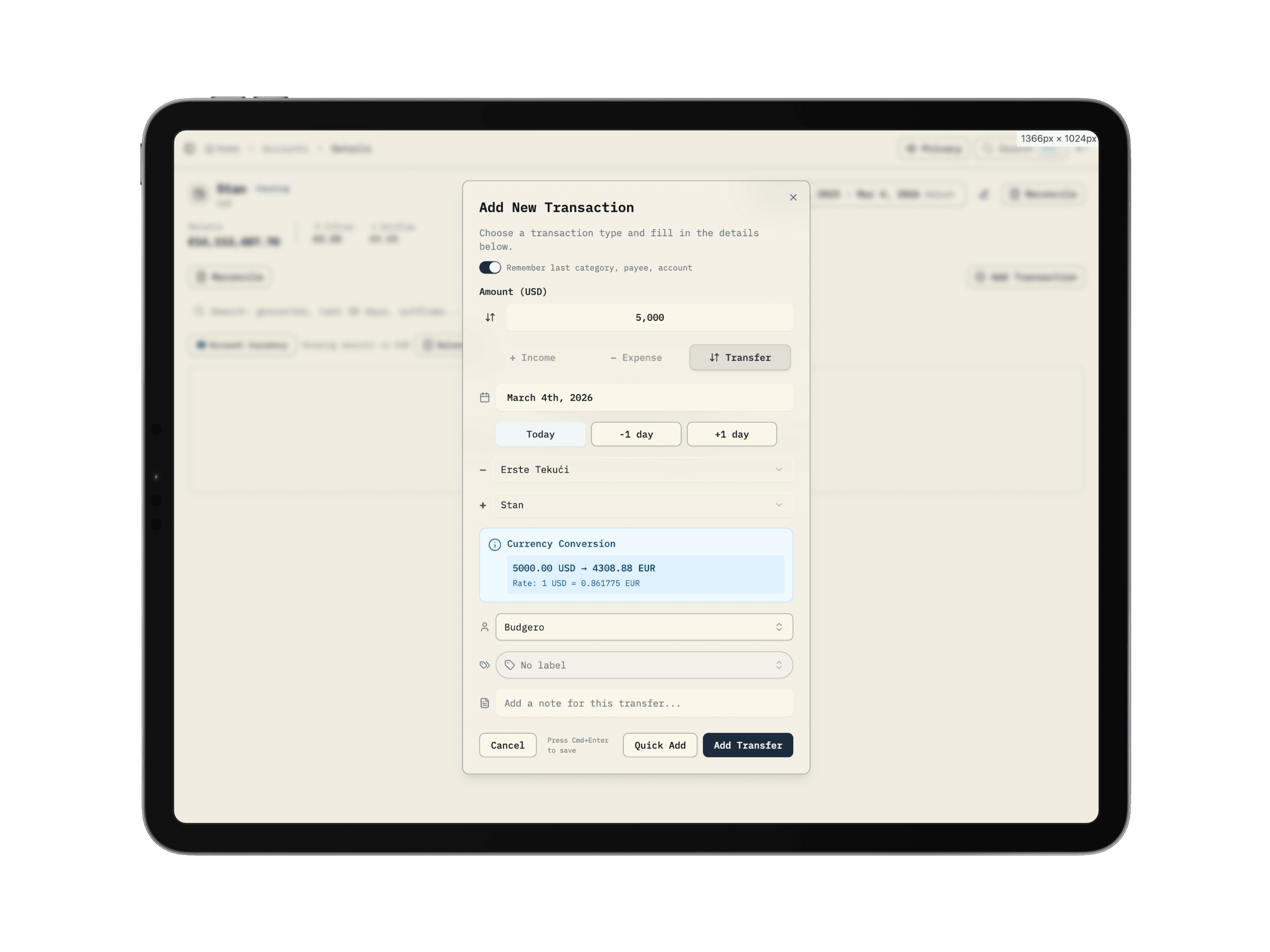
Budgero records an original account amount and a converted budget amount. This supports a household using EUR and GBP together, but it comes with a different import workflow: you bring a statement file or enter transactions yourself.
A EUR budget with a GBP account
Suppose your household plans in euros and keeps a British account for travel. Set EUR as your budget currency and GBP as that account's currency. A £50 transaction stays visible as £50 in the account, while categories and reports use its euro value.
At an illustrative rate of €1.18 per £1, that purchase uses €59 of the category's available money. To record an actual conversion cost of €60, override the transaction's rate to 1.20 so the budget reflects that cost. These rates illustrate the calculation; they are not current exchange-rate quotes.
Budgero keeps the original amount, converted amount, and rate together. Read the currency and exchange-rate guide for transfers, rate overrides, and offline use.
Bring your bank transactions with you
Turn on optional bank sync (beta), or download a CSV, map its date, description, and amount columns, then review the imported transactions against your statement. A supported currency does not guarantee that every bank's export needs no adjustments. Start with a small sample and check date formats, decimal separators, and debit/credit columns before importing your history.
Follow the CSV import and reconciliation guideWhy European Households Choose Budgero
Actually Works in Europe
Plan in EUR, GBP, CHF, and other supported currencies. Enter transactions manually, import a bank export, or connect European banks with optional bank sync (beta).
Tax-Inclusive Cloud Pricing
Cloud prices are listed in USD with tax included. Check your checkout total and payment provider’s conversion terms for your local cost.
Encrypted Budget Contents
Zero-knowledge encryption means we cannot see your data. Even a server breach yields encrypted blobs, not your financial history.
65% Cheaper
Monarch costs $99.99/year. Budgero Cloud is $35/year — save ~$ 65/year. Or self-host on your own EU server for free.
Budgero vs. Monarch Money — The European View
| Feature | Budgero | Monarch Money |
|---|---|---|
| Official availability in Europe | Browser app; no bank connection required | US and Canada only |
| Currencies in one budget | 168 currenciesOriginal amounts plus conversion | USD or CAD displayNo native currency conversion |
| Annual price | $35/yearOr free with self-hosting; hosting costs may apply | $99.99/yearCheck current plan and offers |
| Zero-knowledge budget encryption | Encrypted before syncing | Server-managed encryption |
| European bank transactions | Optional bank sync, file, or manualOptional (beta), bring your own Enable Banking; zero-knowledge | No European bank syncOfficial coverage is US/Canada |
| Investment tracking | Manual asset valuesNo automatic security prices or brokerage sync | Brokerage connectionsCheck your supported institution |
| Self-host option | Docker; choose your hosting location |
Who This Is For
You're a great fit if you:
- Live in the EU, UK, Switzerland, or the Nordics
- Tried Monarch and discovered it doesn't work here
- Earn or spend in more than one European currency
- Want end-to-end encryption for budget contents
- Want a manually maintained household budget in multiple currencies
- Want the option to self-host on your own EU infrastructure
Stick with Monarch if you:
- Are based in the US or Canada and bank there
- Need automatic investment sync from a US broker (Fidelity, Schwab, etc.)
- Budget in USD or CAD without needing currency conversion
- Want hands-off bank sync with zero setup
Monarch is a solid app for US households. We are honest about that.
Frequently Asked Questions
Is Monarch Money available in Europe?
Monarch’s official FAQ lists the US and Canada as its supported countries. Its currency documentation describes dollar display without conversion between currencies, so a European household needing EUR and GBP accounts in one budget should consider another option.
Is Budgero a suitable Monarch Money alternative for Europe?
Budgero can suit households that need multiple currencies and end-to-end encrypted budgeting. Bank sync is optional and in beta, through your own free Enable Banking account (PSD2 open banking); coverage varies by bank. It does not offer brokerage sync. If hands-off bank feeds with zero setup are essential, check an alternative with documented support for your specific European institutions.
Can I hold EUR and GBP accounts in Budgero?
Yes. Choose a budget currency and set each account’s currency separately. Transactions retain their original amounts and use exchange rates for budget totals. You can override a transaction’s rate or converted amount when a statement uses a different rate.
Does Budgero connect to European banks?
Yes, optionally. Bank sync (beta) uses your own free Enable Banking account and PSD2 open banking: you log in at your own bank, and the traffic is encrypted in your browser so Budgero's servers can't read it. Setup takes about 15 minutes, once, and bank access typically needs renewing every 180 days. You can still use manual entry or import a supported file such as CSV, OFX, or CAMT.053; preview formats and reconcile balances.
How does Budgero protect my budget?
Budget contents are encrypted on your device before they sync. Cloud hosts encrypted budget data in Finland; self-hosting lets you choose your server location. Account and billing data are handled separately under the privacy policy.
Does Budgero track investments like Monarch?
Budgero lets you record asset values manually. It does not replace Monarch’s automatic brokerage connections or security-level investment tools. Decide whether a manually updated net-worth view meets your needs.
How much does Budgero cost in Europe?
Cloud is listed at $4/month or $35/year in USD, tax included. Check the checkout total and your payment provider’s conversion terms. Self-hosting has no software subscription fee; hosting costs are separate.
Can I import my Monarch Money transactions?
You can map a Monarch transaction CSV in Budgero’s file importer. Create or select the destination accounts, check dates and amounts in the preview, then reconcile each account. CSV transaction import does not recreate every budget setting, target, or account balance history. Review possible duplicates before importing overlapping date ranges; ambiguous matches require your decision.
Sources and scope
By Budgero, the maker of one of the apps compared. The references below were checked on . These are documentation-based comparisons; bank availability and subscription offers can change. Check the provider's current terms and your specific accounts before switching.
Real Users, Real Budgets
What Budgero Users Are Saying
People who switched from YNAB and other tools share their experience.
I used YNAB for years and love zero-based budgeting. Budgero nails the same methodology with a design I actually enjoy using. I keep coming back because I'm a budget geek. The SQL Explorer is a dream if you have a technical background.
I started with YNAB and then tried a bunch of different tools over the past year. Budgero is the closest to perfect for my use case while also matching what I want visually. Transaction entry is fast, the savings goals with sub-sections are exactly what I need, and the whole experience just feels right.
The app is really advanced in both functionality and UI. I was impressed by how polished the whole experience feels. This is a serious budgeting tool with a design that competes with anything on the market.
The latest update made a noticeable difference. Animations are smoother, everything feels faster. Nice to see a budgeting tool where the developer actually cares about performance.
A budgeting app that actually works in Europe.
Start your 35-day Budgero trial. Bring a supported bank export and try budgeting across currencies with zero-knowledge encryption. Cloud is $35/year; self-hosting has no software subscription fee.
Also see: Full Budgero vs Monarch · YNAB alternative for Europe